


Automatic Emails
Automatic Emails

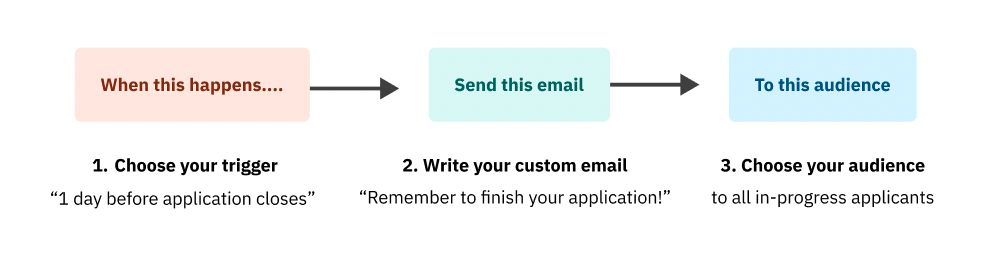
The new automatic emails feature allows you to schedule emails to the right people at the right times. Further, customize your emails and set the rules (who it’s going to and when it’s being sent) ahead of time — StartupTree will do the rest.
Why we built it
Why we built it
If you aren’t doing follow-up and reminder emails for your events, you are definitely missing out on some engagement! However, many of our customers were trying to send email reminders manually or using external tools. Both methods resulted in lots of wasted time with 54% of the polled webinar attendees spending 1-3 hours organizing reminder/follow-up emails for a single event.
How you will benefit
How you will benefit
- Save time and money: cut down time spent importing/exporting audeince and additional costs from other email automation software by engaging specific audiences right in StartupTree
- Less stress: don’t wait to export your email audience the day of — create your email, make it automatic, and boost your engagement!
PRO TIPS! 💡Reminders to in-progress applicants will help you get many more submitted applicants to the finish line! 💡We strongly suggest 24 hour and 1 hour reminders for events to increase your registration to attendance conversion rate.
Top Automatic Emails to Try Out
Top Automatic Emails to Try Out
Event Promotion: promote your event to users on StartupTree
Event Reminder: remind users that have RSVP'd to your event that it's happening soon
Event Follow-Up to RSVP: thank attendees for coming to your event and share resources
Application Promotion: promote your app/competition to users on StartupTree
In-Progress Applicants Reminder: remind users who have started an application to complete it before the deadline
Application Follow-Up: provide applicants with a confirmation and when to expect next steps
Get Started Today 🚀
Get Started Today 🚀
You can start using automatic emails today by navigating to your StartupTree platform's Admin Panel → Promote → Automatic Emails.
Follow these three simple steps:
______
______
User Management Dashboard
User Management Dashboard
Our user management dashboard enables admins to get the user information they need on demand. Now, you can easily find user information, filter down user lists to target specific audiences, tag users in bulk, and create self-curated user exports.
Why we built it
Why we built it
User data is one of the most important tools one can use in a people-driven organization such as the ones that StartupTree helps manage. This feature makes sorting through user data as robust and easy-to-use as possible.
How you will benefit
How you will benefit
- Highly customizable: do what you need to do with the exact users that you need at any given time
- Manage things in one place: don’t worry about managing a ton of different spreadsheets to get what you need from your list of users
Top Benefits of the User Management Dashboard
Top Benefits of the User Management Dashboard
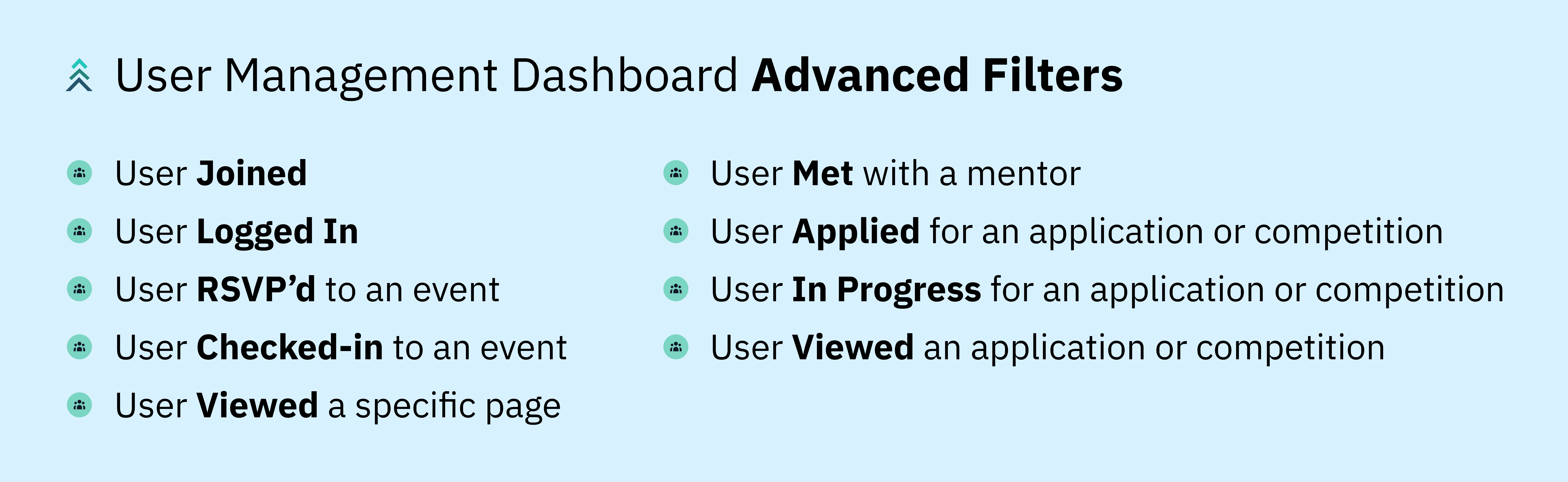
Learn how to boost interest: tag all users who RSVP’d and checked in to an info session, but did not apply to the associated program.
Identify needs: for example, find all users who applied to an application last year and remind them for this year.
Send bulk emails: send mass emails to a filtered group of individuals to keep communication need-to-know.
💡 If you want to send an email to a specific group of users, tag all users that meet certain criteria with a certain tag. Then you can send a bulk email to all users with a certain tag through the StartupTree platform. Another way to do this is by exporting a filtered group of users, then importing them as recipients in your email.
Keep your data organized: add tags (eg. everyone who’s met with a specific mentor, everyone who started a certain app)
If you’re interested in learning more about advanced filters in the user management dashboard, check out this article.
Get Started Today 🚀
Get Started Today 🚀
You can start exploring the user management dashboard today by navigating to your StartupTree platform's Admin Panel → People → Users.
Our Advanced Filters allows you to try any combination of our current user filters:
______
Custom Analytics Hub
Custom Analytics Hub

With StartupTree's new Custom Analytics Hub, you’ll know your organization inside and out. It provides elevated, real-time analytics to support the monitoring and reporting of your programming. You can get access to any StartupTree data you want, any way you want to see it.
💡 This add-on service allows you to monitor data in real time, providing heightened visibility for impact reporting, improvement of operational inefficiencies, and more!
Why we built it
Why we built it
When you're providing so much value through different programs and initiatives, it can be difficult to take a step back and reflect on your overall impact. Your data may be scattered across multiple platforms or you simply may not have the time to manually correlate certain pieces of data together.
StartupTree's Custom Analytics Hub enables you to see how your entrepreneurial ecosystem is performing at a high level like never before.
How you will benefit
How you will benefit
- Know all your stats: show your stakeholders what they really want to see with engagement, demographic, and impact tracking over time.
- Stay informed and make data-informed decisions: determine how you're hitting your program KPIs and what your most effective channels are.

Top Custom Analytics Used by Exisiting Entrepreneurship Programs
Top Custom Analytics Used by Exisiting Entrepreneurship Programs
Venture Tracking: track ventures engagement & measure performance
Impact Metrics: view live demographic trends and see progression of ventures through various programming stages
Get Started Today 🚀
Get Started Today 🚀
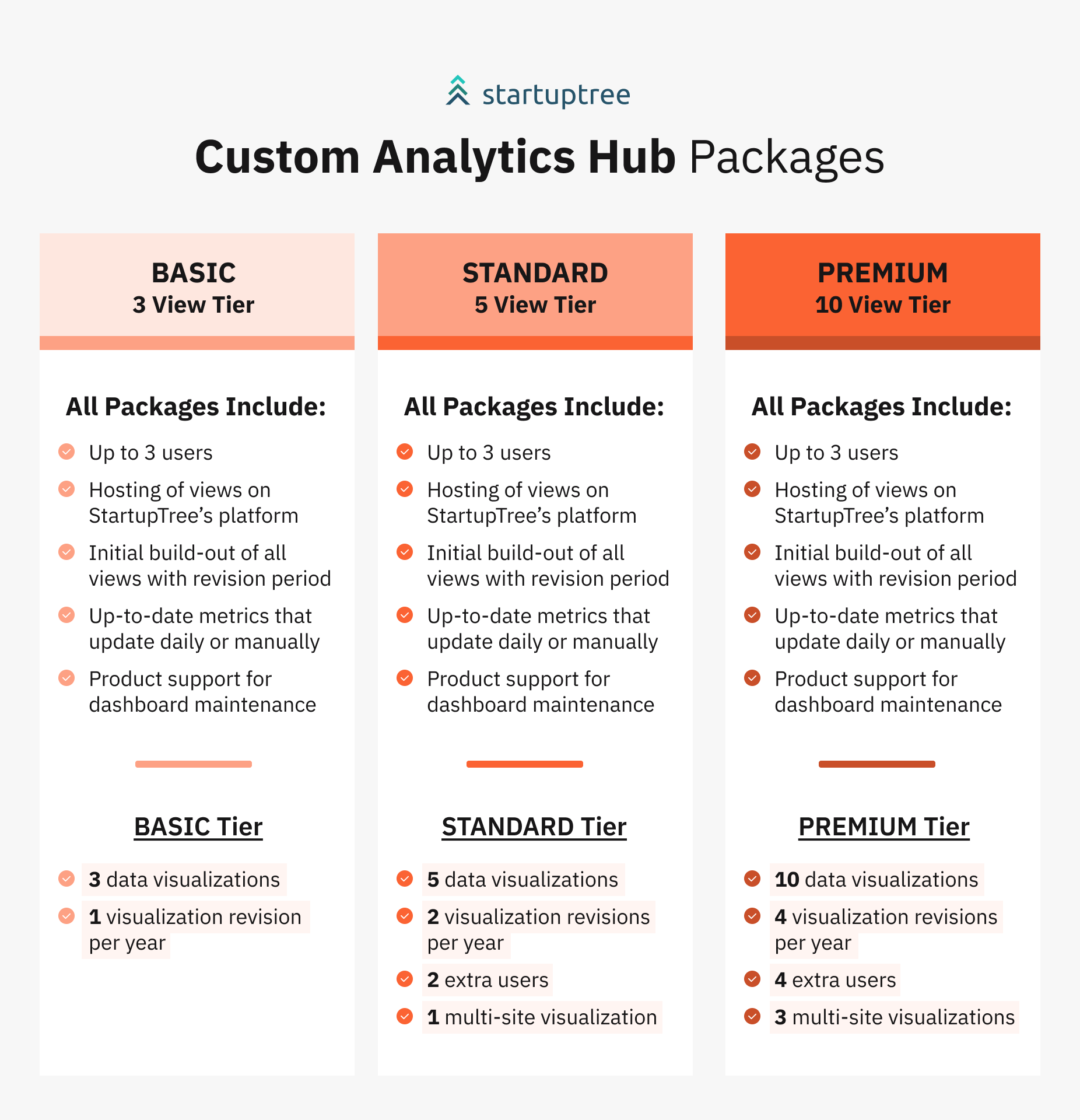
This is a new service offering StartupTree is offering to pair with any entrepreneurial ecosystem's platform package. Due to high demand, we currently have a special offer for existing customers to be prioritized on our waitlist.